


Introducing CampusESP’s
Family AI Assistant
Available for free trial through September 2026
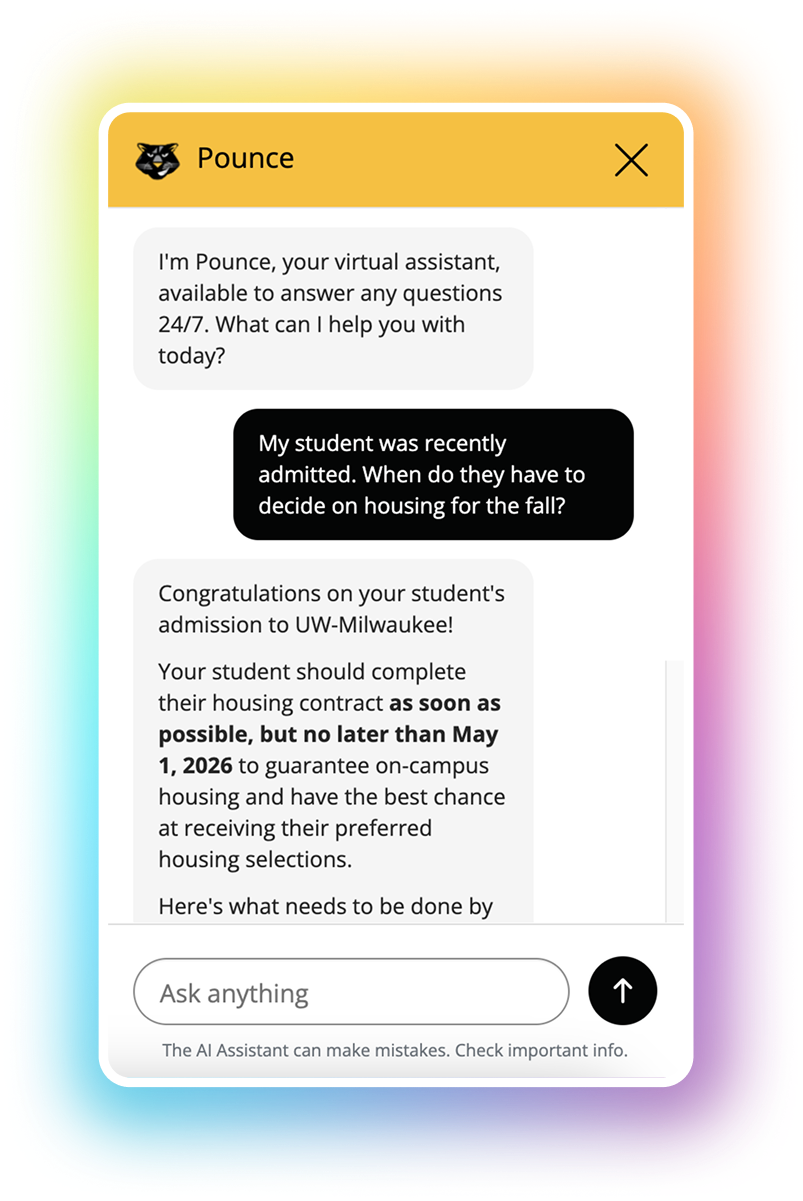
Meet your new
Family AI Assistant.
Your families have questions at midnight. On move-in day. Right before a financial aid deadline. When those questions go unanswered, colleges miss opportunities to build trust and better support families.
After beta testing with 25 colleges and supporting over 9,000 AI conversations across 3,000 families, we're excited to bring our ESP Sense™ Family AI Assistant to all CampusESP customers!
It helps you...
Deliver real-time, 24/7 support during odd hours and high-volume moments
Improve engagement strategy with a clearer window into family concerns
Identify early signals of enrollment, fundraising opportunity, or student risk
Your free trial, step by step
There’s nothing you need to do to get started Here’s exactly what happens, and when.
-
May 26 — Family AI Assistant is Enabled in Preview Mode
The Family AI Assistant is now available for admin review — all before families see anything. Think of this as your behind-the-scenes window to explore, test, and get comfortable. You’ll have a new “AI Workspace” in your CampusESP platform, where you can view which personas you have access to, explore and add new AI training sources, test how the Family AI Assistant responds in a testing sandbox, and add any customizations. -
May 27–June 15 — Three-Week Preview & Opt-Out Window
You have three weeks to explore the Family AI Assistant, attend live training sessions, review our written and recorded customer guides, and decide if you want to participate in the free trial. During this period, your families see nothing — only you can preview the experience.
-
June 15 at 2pm ET — Opt-Out Deadline
If you’d prefer not to participate in the free trial, submit your opt-out request before this date using the form below. Note: If you opt out of the free trial, the Family AI Assistant will not be deployed for families, but the AI Workspace will remain in your platform, allowing you to test and preview these features at any time.
-
June 16 — Family AI Assistant Goes Live for Families
For schools that haven’t opted out, the Family AI Assistant becomes active in your portal. There will be a new widget to engage with the Family AI Assistant on the bottom righthand corner of the newsfeed. There will also be a new content block in the newsletter.
-
June 17 — Families Are Notified Of Their New Resource
Families receive a series of emails, letting them know the Family AI Assistant is available and how to use it. No action is needed from your team, but the emails are already available under Content > Emails if you’d like to review and edit them. The email dates include:
- June 17: Initial launch email
- June 24: First of a series of recurring emails
- July 1: Second recurring email
- July 8: Third and final recurring email
-
June 16-September 15 — Your Free Trial Period
Full access to the Family AI Assistant at no cost. Use it, watch the analytics, collect family feedback, scale your summer support bandwidth, and experience the impact firsthand. At any point during the trial, you can purchase the Family AI Assistant and lock in continued access.
-
September 15 — Free Trial Ends
The free trial concludes. Customers who haven’t yet purchased can do so to continue uninterrupted service for their families.
Your free trial, step by step
There’s nothing you need to do to get started Here’s exactly what happens, and when.
Resources to help you
hit the ground running
You won’t be navigating this alone. We’ve built dedicated training sessions, on-demand demos, and step-by-step guides specifically for this launch.
Academy Session — June 4: Live training walkthrough with our team. Best practices from our users at University of Montana. Get your questions answered in real time. Register
Academy Session — June 9: A second live session for teams that couldn’t make the first. Same content, another shot. Register
On-Demand Quick Start Demo: Watch a quick walkthrough of the Family AI Assistant on your own schedule. Watch now
On-Demand Best Practices Video: Continue your training with more AI tips and tricks. Watch now
Customer Guides: Three step-by-step guides covering setup, customization, and analytics. View guides
Everything you’re probably wondering
We want you going into this with full confidence — not questions.
-
No setup required on your end. The Family AI Assistant automatically indexes your existing portal content — events, posts, emails — so it’s already trained on your institution. You can preview the experience immediately in your admin portal, and families won’t see anything until June 16.
-
We recommend exploring the Family AI Assistant, attending a training session, or reviewing our customer guides. Beyond that, there’s truly nothing you need to configure or build. If you’d like to, you can customize the branding, training sources, or custom instructions — but most of our beta testers didn’t find that necessary. If you decide the trial isn’t right for your institution right now, submit your opt-out form by June 15 at 2:00 PM ET.
-
On June 16, families will be able to see and interact with the Family AI Assistant. On June 17, families will receive an email notification introducing the new offering. Newsletters will also include a content block highlighting the Family AI Assistant. All of this is handled automatically — no email to write or schedule.
-
We won’t launch your Family AI Assistant before you’re ready to launch your larger CampusESP subscription. You’ll still have an opportunity to participate in the free trial, and we’ll work with you on a case-by-case basis.
-
The trial is completely free through September 15. Afterwards, pricing typically ranges between $3,500-$5,500 a year per persona, depending on institution size.
-
Yes — and we encourage it. Once you see the engagement data rolling in, you’ll want uninterrupted access. You can generate a self-service quote anytime in your portal under the AI Workspace in Customize Personas. No need to wait for a sales call.
-
The June 15 deadline is the window to opt out before families are enrolled in the trial. If you have special circumstances after that date, reach out to your CampusESP contact. We’re here to support whatever decision is right for your institution.
-
The Family AI Assistant handles the questions families ask most: upcoming events, housing, financial aid, class registration, and general portal navigation. Beta testing showed top satisfaction with real-time, specific answers. If a question falls outside its training, it’s designed to acknowledge that and guide families to the right resource rather than guess.
Prefer to sit this one out?
We’d genuinely love for you to experience the trial — the data from beta alone tells us this makes an impact, and there’s no work required to participate. But we understand every institution is different. If you’d like to opt out, you have until June 15 at 2:00 PM ET to let us know.